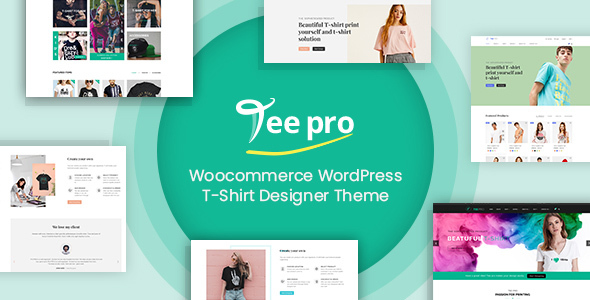
TEEPRO – Woocommerce Custom T-Shirt Designer WordPress Theme
Original price was: $89.00.$44.50Current price is: $44.50.
Why should buy from us
- 100% Legit and Clean Code : Receive fully legitimate and clean code directly from the original source, ensuring reliability and security for your projects.
- Instant Payments via Crypto : Enjoy seamless, instant transactions using cryptocurrency, eliminating delays and providing a secure payment experience.
- Global Accessibility : Accept payments from customers worldwide without the hassle of currency conversion or international transaction fees.
- Secure and Transparent Transactions : Benefit from the security and transparency of blockchain technology, protecting your transactions from fraud and ensuring trust.
- High-Quality Scripts : Get high-quality, well-documented scripts tailored to your needs, backed by direct support from the original developers.
More Information
- Code Delivered in 24 Hours : Receive your code within 24 hours, directly from the original store.
- 100% Authentic Code : Get 100% genuine code sourced directly from ThemeForest.net and CodeCanyon.net.
- Affordable Pricing : Our prices are competitive because the code is shared by individuals who purchase directly from the original marketplaces.
- Chat or Email for Details : Contact us via chat or email for more information and to learn how we ensure quality and authenticity.
Description
TEEPRO Woocommerce Custom T-Shirt Designer WordPress Theme is one of the top WordPress T-shirt theme on Themeforest at this time If you have a T-shirt printing store do not miss a chance to install it on your site to enhance your revenue We have an Outsourcing Project Department to work with your projects and are supporting your partners around the global If you need to hire a team or set up a full TeePro online business please feel free to contact us at project netbaseteam com to discuss further Below is the full feature specification of TEEPRO Woocommerce Custom T-Shirt Designer WordPress Theme WHY USE THIS PRODUCT PRODUCT BENEFIT We take pride ourselves to provide the highest quality TEEPRO WooCommerce Custom T-shirt Designer WordPress Theme with many benefits below The theme was designed with the high-standard of UI UX so your customer will have a complete shopping experience Furthermore the theme is really friendly and useful because it helps customers find and buy products in the fastest way without any trouble Save huge time for customers on shopping The most important thing that makes our theme stand out of other competitors is a Powerful Core theme that helps admin creates anything without coding any line Admin can change the header layout product page with a few clicks Make your site in the high level Including 3 Home page layouts multiple Headers and Footers in this theme that make your site more variety Admin can change the header layout product page and so on Easy to install and configure Especially we ensure the price is reasonable with a high-quality product and our dedicated team is available to support you whenever you need HOW IT WORKS FOR CLIENTS If shop owner have a little knowledge about technology just follow steps below Step 1 Customers select products or searching for products they want to buy on Mega Menu Step 2 Customers can select and compare multiple products together by clicking the Add to compare Then if they want to view their products click on the Cart Customers flexibly change the display styles to view the product as list or grid In addition customers can share your favorite products on social networking sites Step 3 Click on Add to cart and then checkout HOW IT WORKS FOR SHOP OWNER If the shop owner has a little knowledge about technology with One click demo data you can import the theme easily Step 1 Install and Active theme Step 2 Select demo Step 3 Choose Import button to start your installation THE POWERFUL CORE THEME Create anything without coding with this core to make your site stronger and high level Multiple headers Our theme comes many header types that you can customize your website exactly the way you want Multiple Footers This theme includes a ton of footer options so you can choose your own suitable one Various Google Fonts Over 800 Google font which you can use and upload Being stored on Google s servers displaying them will be fast reliable Powerful typography feature Easily change and control your typography as well as fonts style to make your site stand out of your competitors Unlimited custom color variations Select and set dozens of color for your elements which are using our Custom Color Picker Multi layouts for product category You have many options to show your category with products on list or grid and you can change its content also Menu layout for product category page The products are displayed as the menu and this is the unique of this theme Multi layouts for product detail page You can edit title sidebar Meta layout and tons of things to make your product page beautiful Custom WooCommerce attribute Show full of product information that customer can fully understand and they want to click adds to card button Dozens of Blog category layouts Amazing features that will make your blog or magazine stand out among others Beautiful blog details style and layout You can design your own awesome blog page with many style and layouts that attracting readers NetbaseTeam SimpleModal Login Easy to log in with a beautiful and friendly interface Custom Element style Easily to change many elements for many features to enhance your website REVOLUTION SLIDER Fully Responsive Mobile Specific Features jQuery 1 7 jQuery 2 x Supported All Sizes Possible Full Responsive Revolutionary 4 Level Advanced Sizes Fullwidth Fullscreen Auto Responsive Slider sizes Published Unpublished Slides Quick and Easy building based on Slider Slide and Layer Templates Viewport based Slide Loading and Progress Huge Number of Possible Transitions Show hide layers on Slider Effects Events Actions Combine Actions over different Layers and slides Left Right Top Bottom Mouse Scroll events Vertical Horizontal Keyboard actions Drag and Pull Carousel Feature Set position color size of Time Line Hide Enable Navigation on Mobile Devices Fancy Navigation Skins with Slider Preview Set Start and End time VISUAL COMPOSER Intuitive Drag and Drop Interface Lightweight easy to use interface that you and your clients will love Creating pages and posts is easier than ever No programming knowledge required Easily Extendable Third party developers please join the party Create your own plugins for Visual Composer for your themes or for sale here on Code Canyon Frontend Editor Enjoy a What You See Is What You Get page building experience with our amazing frontend editor See how your content will look on the frontend instantly with no additional clicks or switches Backend Editor Prefer to work on backend No problem Visual Composer still supports native content management on the backend with all the important functions and options at your fingertips Object Oriented Code Visual Composer uses the most advanced and most effective programming patterns to get the best results for your site Multilingual Ready po and mo files included for easy translation BG DE ES IR FR IT JP NL PL BR RU TW and Arabic contributed by users Template System and Library Copy or re-use existing pages save pages or parts of pages as templates Set default templates for your post types Access Template Library for free downloadable layout templates crafted by web design professionals and updated regularly Responsive Design Your content will look great on both desktop and mobile sites Take full control over responsive design define column size offsets and display options Instantly check out how your content is displayed User Role Manager Control user group role access to the features and options of Visual Composer including drag drop templates and elements manage WordPress default and custom roles Custom Post Types Support Works with any post type Yes even custom post types Lifetime Update Free of Charge We offer automatic updates free of charge Stay up to date with Visual Composer and receive our latest releases and enhancements Professional Dedicated Support Our high quality dedicated support team is always on hand to help you out Shortcode Mapper No more shortcode copy paste Add any third party shortcode to the list of VC menu elements for re-use Edit params values and descriptions Design Options Control how elements look with new Design Options Set borders margins paddings border radius and background with a few simple clicks Use color panel and alpha to enhance your design Create up to date design solutions with ease Multi-language Support Visual Composer is compatible with qTranslate X Polylang and powerful WPML Build multi-language websites with Visual Composer SEO Friendly Visual Composer is fully compatible with most popular SEO plugins by Yoast Make sure your page is getting the attention it deserves Woo Commerce Support Running a Woo Commerce powered e-shop No problem Visual Composer is fully compatible with Woo Commerce Even better all of the Woo Commerce shortcodes are now available in the Visual Composer Element Menu once you have both plugins installed Advanced Grid Builder Visual Composer has 40 predefined grid templates for displaying posts pages custom post types and media in grid or masonry grid Don t like predefined templates Create your own grid element using Grid Builder Full Width and Height Rows Create full width and height rows with smart stretching options Control stretching params stretch just the background or background with content Control element placement in the middle or on top Build sections in seconds Parallax Background for Rows and Columns Add parallax style background to Visual Composer rows and columns Combine Design Options video and parallax background to create even more advanced layouts YITH WOO-COMMERCE WISHLIST Create multiple wishlists users will be able to create and manage multiple wishlists in case they prefer to split the products by category or by other paratemeters Ask for an estimate for the products in the wishlist let users send the wishlist to the administrator of the e-commerce to ask for a custom estimate about the product they are interested in Allow searching user s wishlists add a search form in the site to let people consult public wishlists Add to cart some or all products in the wishlist so that your users can decide whether to select some or all products in their wishlist and go to checkout page with a simple click only Display a table with popular products of your shop see which products appear most frequently in your users wishlist and make special offers for them Display links for creating manage and search wishlist so that your users can directly access them from the wishlist table Inform and invite unlogged users to register so that they can benefit from all wishlist features Send a promotional email the best way to tell your users about special offers or to propose a unique one by yourself See the date of addition of a product in a wishlist for a precise and aimed check to offer more information to your clients YITH WOO-COMMERCE QUICK VIEW Choose what type of button to display decide whether to display a quick view button or a customized icon to access the quick view and decide where to place it near add to cart button or within the product image Browse products within quick view so that you can quickly move to the previous or next product Without leaving the window Choose information to display you can decide if displaying all information of just part of it Choose displaying method for quick view as modal window or with a cascading unrolling effect Access product detail page from quick view thanks to the additional view details button Share quick views in social media to be social-friendly and share quick views of your products on face book twitter pinterest google or send an email Customize style you can decide colors of the quick view button and everything that is within the modal window Place the quick view where you want use the available short code to make your users see a specific product in any page YITH WOO-COMMERCE COMPARE Show the comparison in another page a page that you can add even among the entries of your shop menu Compare elements by category removing every doubt of your customers thanks to the compare by category option Exclude specific categories in this way they won t be available for the comparison and on the contrary you can even activate only those selected to be compared Add an image ahead of the table customize the comparison table as you want Compare always the product information no more comparisons with empty fields these will be automatically hidden Share the comparison on social network sites create your comparison and share it on facebook twitter google and pinterest Show immediately the related products thanks to a slider under the table that shoes the products with the same category tag Change style and colors make the plugin totally compatible with the layout of your site Customize attributes add those you want for your products and make them appear in the comparing tables Create a table with the desired products select the products and use the generated short-code to add the table in the page you want COLOR SWATCH PLUGIN You can swatch your size or color attributes with color block or image Supports color image text variation swatches and dropdown select Woocommerce improved variable product attributes and swatches attribute Global color or image values for attributes Inbuilt color image product filter Works on mobile devices Inbuilt direct variation link feature Different sizes of swatch from small to large Square as well as round swatch support Option to display option name below swatch Shows color or image swatches on shop category tag archive pages Change product image on swatch hover on category archive pages PRICE MATRIX EXTENSION Enable Price Matrix extension in Admin panel User can enable extension in configuration system then change color for background text delimiter and others User can preview matrix in back-end After finished configuration user can preview matrix table before showing out in frontend User can easily choose direction for created attributes On the tab price matrix user can drag and drop attributes in vertical or horizontal direction then user can select to show all attributes in vertical group or horizontal group Show Price matrix in product detail After user are satisfied with price matrix table in preview matrix user will show it in product detail on frontend It is easy for buyer to view and choose price of each product in price matrix table Shopping Cart – After choosing suitable price of product customer will add to cart then product will go to shopping cart with exact detail information then press Proceed to Checkout to finish ORDER UPLOAD IMAGE Buy separately Upload files directly on the product details page Shoppers can bind images or upload files directly into each product on the product details page when they place an order for this product Support multiple files type Shoppers can upload almost any file types like jpg jpeg png txt doc docx xls xlsx psd cdr Upload multiple files at the same time Upload multiple files at the same time using Ajax do not need to refresh the pages Delete cancel files during upload process Throught upload process shoppers can DELETE any files uploaded with just one click They can add comments into the standard WordPress order comment After upload complete images files will be automatically thumbnails created Besides shoppers do not have to login to upload files Display uploaded files on the checkout page After uploading files images shoppers can add this product into their cart So a shopper can upload different files images into different products and add all into cart and check out the same times Uploaded file will display on the shopping cart page into the WordPress order of client account Display uploaded files in the confirmed order email Display files in the WordPress order confirmation email sent to clients admin Used as a custom WordPress product field – Used as a custom WordPress product field so you can allow which products are uploaded or not Files are managed inside Order Management admin panel Configure file types Administrators can configure which file types are allowed to upload in the module settings Set the width and height of the flash upload window ONLINE PRODUCT DESIGNER PLUGIN FOR WOOCOMMERCE WORDPRESS Buy separately Developing of printing technology enhances our life quality recently Customers do not have experience in photoshop but they also want to create their own design as customize T-shirt mugs pillow photo canvas business card phonecase and so on It is very easy if your site integrated WordPress Online Product designer WordPress Online product designer plugin is the best extension and indispensable conditions for all printing website at this time WHY USE THIS PRODUCT PRODUCT BENEFIT This is a new powerful design tool which helps customers customize multiple printing products create a complete solution for the printing business WordPress Online Product designer is a responsive plugin packed with exclusive functionality that provides customers a great experience with the high-quality outcome With customizable products collection customers can get a vast artwork gallery with flexible custom options like clipart Google font color style and so on The user also adds text number or personalized image Online product designer simplifies a creating product process suitable for all kinds of customers The design tool is easy to install and provide final outcome in printing process Come with many ideal features this plugin enables the users to showcase unique ideas and make an awesome design through smooth clickable options like rotating dragging and flipping of text picture The designed outcome can be shared through many social channels Besides an administrator can set up the price as well as manage information of your customer or all designed product easier You can design anything – You can design as bag banner bookmark business card button calendar cap catalog cd cover certificate door hangers envelope invitation label lettering phone case mouse pad mug notepad photo album poll sign postcard posters shoe signage sticker tag t-shirt x stands WHO SHOULD USE THIS WOOCOMMERCE ONLINE DESIGNER Print Service Providers Whether you are a screen printer or do DTG printing t-shirts or business cards we have got you covered Configure your application with multiple printing methods and design parameters Print Brokers Focus on customer service offer online and custom quotes online artwork approvals and outsource jobs to multiple vendors with vendor management In-plants Manage departments and users with role-based access predefined templates and artwork approval workflow automated job sheets Marketing Organizations Offer branded storefronts with exclusive templates customize marketing assets while retaining brand and regulatory compliance across the board Trade Printers Collaborate with designers and printers in different countries offer storefronts and commissions run marketing campaigns and one-off projects Sign Printers Offer off the shelf products as well as ready-made templates for personalization Accept custom jobs with online file upload HOW IT WORKS FOR CLIENTS With steps below everyone can be easy to use WooCommerce Online Designer Plugin without design knowledge First go to product detail page which you want to design Then click on Start design button to start Then you can add text add art upload your own image add code into your product you chose Furthermore you can change color size font shadow opacity pattern to suit your needs Especially you also can use brush to draw you can create your own signature This is amazing feature that you cannot find in any designer plugin After designing you can preview it with zoom and view function change the order of layers and edit as you want To finish the design process you click to Add to cart button to receive product as you wish After receiving your design Administrator will consider and send an email notification to you to inform that your design is accepted or rejected If your design is rejected please go to your account to design again You can design until admin approve it HOW IT WORK FOR SHOP OWNER Set up plugin by file zip Active plugin Config plugin NBDesigner – Setting Choose and setting information in other tabs as Manager Product Manager Arts Manager Fonts – Go to any product and enable design Upload image to design setup area design – You also can add more image to design and then click on Preview Changes button to view it Below is full detail Features of Online Product Designer Plugin for WooCommerce WordPress ADD TEXT AND CURVED TEXT Shopper can add text with various colors fonts and sizes Especially they can curve text in their design and edit anything of text as shadow pattern rotate opacity outline line height background etc Any text and font are available for your choice There are plenty of fonts being included in Font Category shopper can find it by pressing More button Font style includes italic bold underline with full type of alignment such as left center right or justified Font color is varied Text background is available and changeable Text pattern is available Creating text shadow according to dimension X or Y Shadow blur opacity shadow color also can be changeable Line height font size and opacity are changeable Outline s color and size are changeable Text layer can be measured Text can be turned curved or rotated reversed Spacing is changeable Default style such as arc straight small to large large to small top large to small bottom is changeable ADD ART FEATURES You can add art change colors move resize rotate and delete art flip center function and so on Art s color can be customized It not only give an easy way to manage color but also allows customers to change color of each part on this image Art can be rotated and changed its opacity Art can be zoomed in or zoomed out Art can be moved or deleted Multiple arts can be added UPLOADING IMAGES If shopper don t satisfied with sample picture they can upload images as they want They also can select from different many sources as Facebook or enter image s url Picture can be uploaded from local url or social network such as Facebook Temporarily saved uploaded files for later use Uploaded file is typed as PNG JPG GIF Its maximum size can be adjusted in backend Art can be zoomed or rotated Creating text shadow according to dimension X or Y Shadow blur opacity shadow color also can be changeable Picture s opacity can be customized Four types of quick-changing picture are available Picture can be turned via tool FREE-HAND DRAWING Especially you also can use many available brush to draw you can create your own signature Drawing brushes such as pencil circle spray pattern square texture are available for different choices Brush and brush width color can be changed Add available geometrics as rectangle circle triangle line and polygon And can change color rotate opacity Picture can be turned or zoomed Picture s opacity can be customized ADD QR CODE You can create QR code and then add to your design Text or QR codes can be added into picture Picture can be zoomed Picture can be moved or rotated POWERFUL LAYERS Drag and drop to sort layers and change layers of items Layer position can be dragged to different positions Layer s can be deleted partly or entirely Scroll can be created when multiple layers exist Certain buttons are used to quickly change layer s position Layer can be displayed or hided easily POWERFUL HELP TOOL More tools are included extension as next zoom in zoom out All buttons are arranged clearly for convenient use Double player Next to the left right up or down Layer can be reversed from left to right or from above to below Vertical align horizontal align Layer can be zoomed Layer can be deleted EASY PREVIEW WITH ZOOM FUNCTION After designing you can preview it with zoom and view function Review all design Zoom in for details Popup full screen GET PHOTOS FROM DROPBOX GOOGLE DRIVE Allow the customers easy to log in and use their photos from their Dropbox Google Drive accounts in custom designs ASSIGN A USER AS A DESIGNER Assign someone to become a designer who can create templates SHARE DESIGN After completing a custom design the customer can share it with everybody via social network facebook google plus twitter linkedin mail DESIGNER PROFILE TEMPLATES PAGE It s a page show designer profile and their list templates SAVE DESIGN FOR LATER If the customer does not want to order current designs they can save them into their account and start for the next time They also can use their stored designs My designs for other products EXPORT DESIGN TO SVG Export design to SVG file which you can easily edit in Illustrator or CorelDRAW EXPORT DESIGN TO JPG HIGH RESOLUTION CMYK MODE AND ICC PROFILE REQUIRED PHP IMAGICK API JPG with high resolution and CMYK mode is the best choice for print in most of the case And you can create PDF files with them ORDER AGAIN THE PREVIOUS ORDER WHICH INCLUDES DESIGN FILE The customer can order again with the last completed order has items with custom designs GET DESIGN FROM WISHLIST CART AND DESIGN STORE The customer can get designs from saved design which they saved in their account and designs exist in the current cart UPLOAD DESIGN WITHOUT CUSTOM DESIGN Allow the customer only upload design files without custom design UPDATE THE GALLERY PAGE We have improved gallery page with left sidebar filter such as categories designers and products The customer can choose quick view design view designer profile and so on OTHER FEATURES OF WOOCOMMERCE ONLINE DESIGNER Easy to use Shopper can easily use this product it is very friendly with customers and special it is very simple to use Compatible with WooCommerce This plugin is an extension of WooCommerce plugin that allows your users to design products easily 100 responsive and mobile friendly You can design on any device as desktop tablet or mobile Various fonts There are many fonts are included in this product Admin also can add more fonts if they want Easily manage products with the online design Products with online design on Front-end will be added on checkbox to distinguish with Product without online design Flexible configuration You can set uploaded file size preview the thumbnail size thumbnail quality show customer design in the cart order admin notifications etc Easily view the detail of customer s design After customers complete their design admin can view the detail customer s design in the order management page in the backend Accepting or declining the design and send the email After receiving customer s design an administrator will send a notification email to customers to inform that their design is accepted or rejected Customer design again easily If your design is rejected please go to your account to design again You can design until getting the approval Power helpdesk The customer can easily design with the power helpdesk Get photos from dropbox google drive Allow the customers easy to log in and use their photos from their Dropbox Google Drive accounts in custom designs Assign a user as a designer Assign someone to become a designer who can create templates Share design After completing a custom design the customer can share it with everybody via social network facebook google plus twitter linkedin mail Designer profile templates page It s a page show designer profile and their list templates Save design for later If the customer does not want to order current designs they can save them into their account and start for the next time They also can use their stored designs My designs for other products Export design to svg Export design to SVG file which you can easily edit in Illustrator or CorelDRAW Export design to jpg high resolution cmyk mode and icc profile JPG with high resolution and CMYK mode is the best choice for print in most of the case required php imagick api And you can create PDF files with them Order again the previous order which includes design file The customer can order again with the last completed order has items with custom designs Get design from wishlist cart and design store The customer can get designs from saved designs which they saved in their account and designs exist in the current cart Upload design without custom design Allow the customer only upload design files without custom design Update the gallery page We have improved gallery page with left sidebar filter such as categories designers products The customer can choose quick view design view designer profile and so on OTHER FEATURES Support Multi Languages Currencies It easily translates or installs new local language built-in currency exchange plugin change flexibly currency and language for your theme website Quick View With YITH WooCommerce Quick View plugin your clients will be free to look in a better way your products reading also a small description with all the most important features Responsive You can design on any devices as desktop tablet or mobile Slider Revolution There is a collection of slider diversity for any type of business SEO Friendly This theme was built following the best SEO to help your sales higher With Yoast or All in One SEO plugin that we recommended you need to install intro this theme we are believe your rank increase significantly THEME UPDATES SUPPORT Free of Charge- After purchase all updates are free of charge Update Guarantee- we will continue to update and improve this theme to keep it the best theme for WordPress The upgrade will be guide in the user guiders of newer version and the buyer has his own responsibility to upgrade the products or not Ticket Support we have a team support private ticket here please register and open ticket support Please read over our support policy as we as Themeforest support policy Support Period we will only support client who has a validated support period from Themeforest if you are expired please buy a new extension of support WORDPRESS TEEPRO THEME USAGES Presales Questions if you have any presales questions please post on TF comment sections Template User guider the template come with a detail user guiders online format which is update often Template Installation on live site you can buy and use it with your current WordPress website which already has product and data Quick start Installation Packages you can set up a completely new WordPress with Quick start Package We have detail documentation for you to install the templates on your WordPress sites and configure the WordPress plugins to work Sample data IS INCLUDED in the purchased package with the product images is placeholder Installation Services for any buyer who do not have time skills knowledge or for any other reasons can buy the WordPress Theme Demo Installation Pack from our team so we can install demo data with images and products pricing configure all the modules to work with WORDPRESS TEEPRO THEME WordPress Project Outsourcing In case you want to customize this templates set up full sites need a team to do maintenance then please feel free to contact our team at project netbaseteam com DISCLAIMERS Refund Policy we are a seller on ThemeForest and we comply with TF support and refund policy If you want a refund please contact Envato team to receive the determination We refuse the refund for client who mistakenly bought HTML WordPress or Magento Teepro Media Images some product images background photos videos banners which use for demo template is the subject of copyright and are not included in the purchase packages and sample data We can replace them with placeholder images so please use your own items Commercial WordPress plugins if the templates is developed to use with some commercial WordPress plugins which is developed and sold separately by our team or other developers then we will listed it here clearly and the buyer have to buy the separated license to use them for the WORDPRESS TEEPRO THEME for your own project We will also not provide any support for those WordPress plugins that are provided by third party developer Version 3 8 0 22 Apr 2023 Compatiable with Wordpess 6 2 Compatiable with Woocommerce 7 6 0 Fixed Quickview error Fixed Compare error Fixed Pagination error Fixed Missing social icon on footer Updated Woocommerce template files Update plugin Slider Revolution 6 6 12 Update plugin NBDesigner 2 8 3 Update plugin WPBakery Page Builder 6 10 0 Update plugin Ultimate Addons for WPBakery Page Builder 3 19 14 Added plugin WorkChat – Live Chat WhatsApp Messenger Skype Phone Added plugin WorkSuite – ERP Workplace CRM HRM Project Manager Company Board Added plugin Contact Form 7 CRM Version 3 7 2 25 Jan 2020 Fixed Ajax shop page Update plugin Slider Revolution 6 3 6 Version 3 7 1 23 Dec 2020 Compatible with WordPress 5 6 Update Ajax filter by price Update plugin WPBakery Visual Composer 6 5 0 Update plugin Ultimate Addons for WPBakery Page Builder 3 19 8 Update plugin Slider Revolution 6 3 3 Version 3 7 0 26 Nov 2020 Added Full Ajax shop sort by pagination filter by attribute size color brand Update plugin WPBakery Visual Composer 6 4 2 Update plugin Ultimate Addons for WPBakery Page Builder 3 19 7 Update plugin Slider Revolution 6 3 1 Update plugin Teepro elements 1 1 4 Version 3 6 0 29 Oct 2020 Added Custom Fonts – easily embed custom fonts files woff2 woff ttf eot Added Ajax Pagination – Infinite Scroll Added Ajax Pagination – Load More Button Update plugin WPBakery Visual Composer 6 4 1 Version 3 5 0 24 Sep 2020 Added Variation Images Gallery Compatiable with Wordpess 5 5 1 Compatiable with Woocommerce 4 5 2 Updated Woocommerce template files Update plugin Ultimate Addons for WPBakery Page Builder 3 19 6 Update plugin WPBakery Visual Composer 6 4 0 Update plugin Netbase Solution 1 9 7 Update plugin Slider Revolution 6 2 19 Update plugin WooCommerce Dashboard for WP Marketplace Multi Vendor Plugin 1 2 7 Version 3 4 0 23 Jun 2020 Added 360 product viewer Added Change product image when hovering Added Change product images by clicking on swatch in category archive pages Fixed Style add to wishlist button Fixed Image Slider does not work on quickview Update plugin Teepro elements 1 1 3 Update plugin Netbase Solution 1 9 6 Update plugin Slider Revolution 6 2 12 Update plugin Woopanel 1 2 5 Version 3 3 3 5 May 2020 Update Woocommerce template files Update plugin Netbase Solution 1 9 5 Update plugin Slider Revolution 6 2 2 Update plugin WooPanel 1 2 1 Update plugin Ultimate Addons for WPBakery Page Builder 3 9 14 Version 3 3 2 3 Mar 2020 Compatible with Dokan 3 3 0 Fixed Filter Close button translation issue in shop page Version 3 3 1 26 Feb 2020 Updated Woocommerce template files Improve WOOF filter style page shop on mobile Update plugin Netbase Solution 1 9 3 Update plugin Slider Revolution 6 1 8 Update plugin Woopanel 1 0 2 Update plugin WPBakery Visual Composer 6 1 Update plugin Ultimate Addons for WPBakery Page Builder 3 19 3 Version 3 3 0 3 Dec 2019 Added Integrate with WooPanel 1 0 0 Fixed Add to cart style button on Edge Browser Update plugin Netbase Solution 1 9 2 Update plugin Slider Revolution 6 1 5 Version 3 2 3 26 Sep 2019 Fixed Minor Css Update Use Instagram Feed plugins to get data from Instagram Update plugin Netbase Solution 1 8 0 Update plugin Slider Revolution 6 1 2 Version 3 2 2 25 Aug 2019 Improved Slider thumb in single product Fixed Minor Css Update Woocommerce template files Update plugin Teepro Elements 1 1 2 Update plugin Netbase Solution 1 5 8 Update plugin Netbase Dashboard 1 2 0 Update plugin Online Design 2 5 0 Update plugin Dokan Pro 2 9 12 Update plugin WPBakery Page Builder 6 0 5 Version 3 2 1 12 Jun 2019 Improved Auto update Google Fonts in customizer Fixed Plugin below Woocommerce 3 6 does not install in Merlin Import Fixed Currency Switcher is compatibility with woocommerce 3 6 Fixed Can not save dropdown elements in Solution Dashboard Update Woocommerce template files Update plugin Teepro Elements 1 1 1 Update plugin Netbase Solution 1 5 4 Update plugin Netbase Dashboard 1 1 4 Update plugin WPBakery Page Builder 6 0 3 Version 3 2 0 22 Apr 2019 Added Support RTL Right To Left Fixed Translation text in cart page Fixed Color swatch does not work when selecting second thumbnail image Fixed Can not add to cart if choose Show design tool to be show design tool in new page in Online Design Option Fixed Product Tabs Element is compatible with Woocommerce 3 6 Fixed Online Design Plugin is compatible with Woocommerce 3 6 Improved Update Woocommerce template files Improved Merlin import demo data Improved Mini cart and testimonial show smoothly Update plugin Netbase Framework 1 4 4 Update plugin Netbase Solution 1 5 3 Update plugin Teepro Elements 1 1 0 Update plugin WPBakery Page Builder 5 7 Update plugin Ultimate Addons for WPBakery Page Builder 3 18 0 Update plugin Slider Revolution 5 4 8 3 Version 3 1 0 7 Jan 2019 Added Size guide Helping Added Integrate with Woof WooCommerce Products Filter plugin Added Integrate with WPML Language Switcher Added Integrate with WooCommerce Currency Switcher plugin Added 3 new styles in Dokan store listing Added 3 new header styles in user template online design Updated Improved css for some pages single product check out cart gallery user template Updated Move merlin import from netbase framework into theme Updated Improved function import demo data Version 3 0 0 31 Oct 2018 Brand new core theme New version of Online Design plugin v2 0 0 Big performance improve New theme options system New layouts for Blog pages New layouts for WooCommerce pages Fully support Visual Composer Version 2 3 0 25 Aug 2018 – Included quickstart package – Optimize data import theme Version 2 2 0 24 Jul 2018 Support RTL Languagues Update Subscribe element to use MailChimp Fixed some css bugs Version 2 1 1 19 Mar 2018 Fixed some css bugs Updated Instagram Widget Configuration the Revslider is only in one screen Version 2 1 0 12 Mar 2018 Add 3 home layouts Update Online Designer latest version Compatible with Woocommerce 3 x Update theme options Version 2 0 0 21 Oct 2017 Update Ajax Cart plugin Update Ajax Search plugin Update Currency Switcher plugin Update Color Swatches plugin Update Online Desginer new version v 1 7 0 Fix bug product gallery slider Compatible with Woocommerce 3 2 x Version 1 6 0 5 Jun 2017 Support RTL style Fix bug ajax cart plugin Version 1 5 1 25 Apr 2017 Compatible with Woocommerce 3 Change header layout Version 1 5 0 29 Dec 2016 Added Home layout 2 Added Home layout 3 Added Read more link to about us page Fixed text position in dropdown cart Fixed increase the distance between content with header in blog detail page Fixed not display google map in contact page Fixed issue slider responsive text is too small Fixed issue top header responsive Fixed error text of service block in screen is 800px Fixed error icon search falling down in screen is 320px Fixed use only a font-family of main menu Fixed error button Show Now of slider when responsive Version 1 1 0 01 Dec 2016 Fixed show title in quickview popup Fixed display color swatch in product detail page Integrated with last version online design Version 1 0 0 27 October 2016 Released You can see TEEPRO Woocommerce Custom T-Shirt Designer WordPress Theme at here To optimize the printing functionality for your website don t forget to integrate Woocommerce product designer plugin It is ONE OF A KIND product on the market